
Understanding Our Reference: The LED Plugin#
As mentioned in Part 1, I’ll be taking my latest plugin, gz_sim_led_plugin, as a reference for all the explanations throughout this guide.
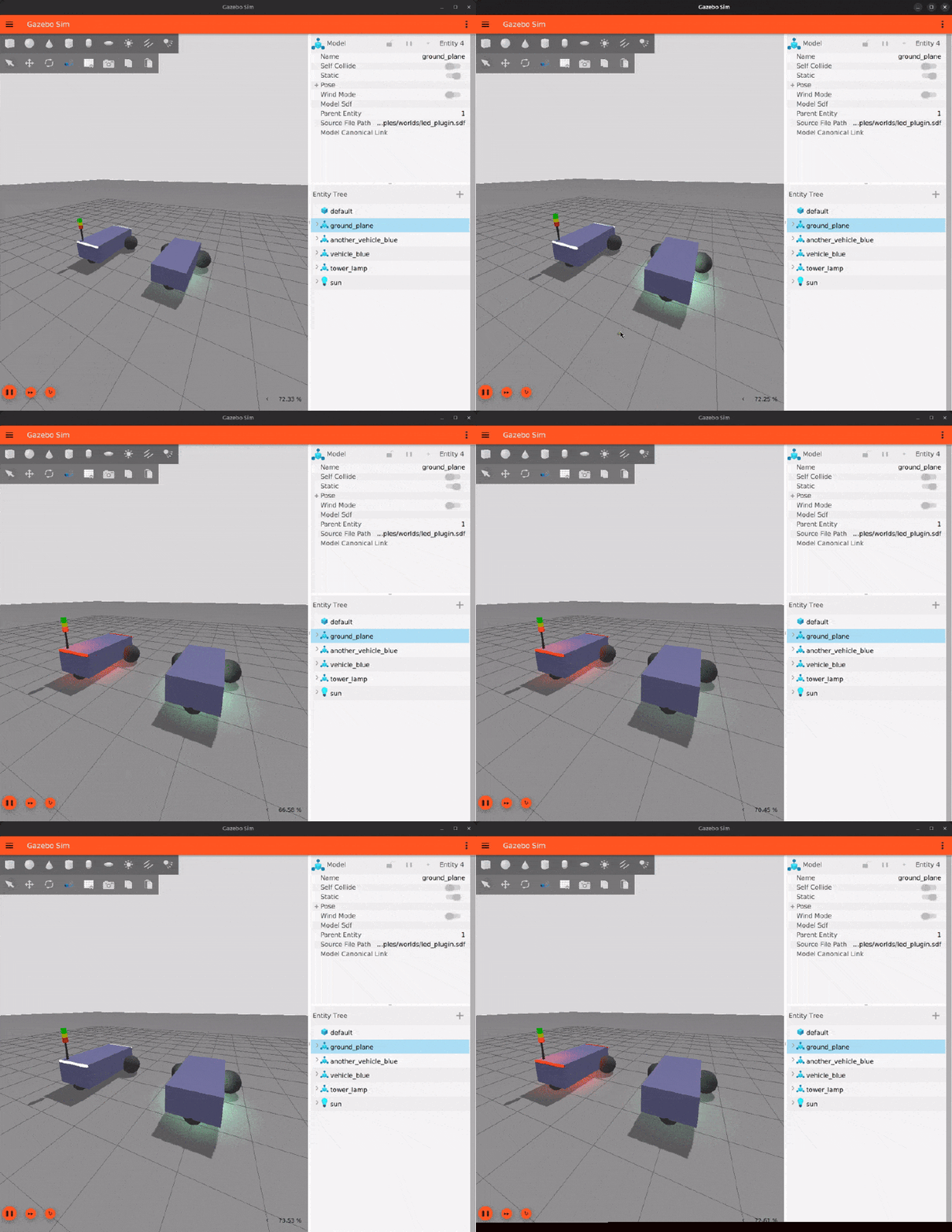
The idea behind the plugin is simple:
We want to simulate LEDs/Indicators in Gazebo.
Why? Because all industrial systems use some kind of indicators (mostly LEDs) to let you know what’s happening behind the scenes. For instance, a robot might
- Use blinking red LEDs in fault / emergency mode to tell operators that the robot is not functioning correctly and human intervention is required.
- Use blinking green LEDs in ready mode to tell operators that the robot is ready to take missions.
- Use solid yellow LEDs when its low on battery to tell operators that the robot needs to be put on charge (or might go to auto charge, if available)
- Use pulsing blue LEDs for on-going docking/undocking operation to tell operators that the robot is performing precision maneuvers so caution is advised.
And so on.
Since such LED patterns map directly to your robot’s internal states/modes, simulating them saves you from needing hardware during development.

Our Plugin’s SDF: The Blueprint#
Before writing a plugin (or in fact any piece of software), it is essential to lay out how your potential users are going to use it. In our case, this will be through some configuration inside the <plugin> tags of an SDF file.
This configuration is made available to our plugin as a sdf::ElementConstPtr instance through the ISystemConfigure interface which is the first thing that runs after a plugin is successfully loaded. Therefore, it is essential to define a possible SDF snippet for our plugin beforehand so that it can act as a blueprint for our Configure() implementation.
Describing our LED Modes: SDF to C++ Struct#
Any potential user of our plugin would want to define a bunch of named <mode> with their distinct behaviors for a bunch of LEDs. The SDF snippet for it might look like:
<plugin name="plugin_class_name_with_namespace" filename="plugin_shared_library_name">
  <mode name="emergency">
    <!-- Describe LED patterns here -->
  </mode>

  <mode name="idle">
    <!-- Describe LED patterns here -->
  </mode>
</plugin>
To define the LED animations/patterns during each mode, we might need different <step> childs of <mode> having their own configurations of:
- Color: RGBA color for the mode’s active LEDs during that step.
- Intensity: Intensity of the LED light sourcem to allow users to create dimming/gradient-based animations.
- On Time: The duration for which this particular step stays “on”.
Chaining up a bunch of <step> with different configurations would allow users to create numerous animations for any kind of <mode>. For <mode> with static configuration, we can have a boolean always_on attribute for <step>that keeps the step, well, always on.
Building upon this, we have our final mode description in SDF that looks something like:
<plugin name="plugin_class_name_with_namespace" filename="plugin_shared_library_name">
  <!-- Emergency mode that creates a Red blinking animation -->
  <mode name="emergency">
    <!-- First step that keeps the Red color on for 1 second -->
    <step always_on"false">
      <color>1 0 0 1</color>
      <intensity>3.0</intensity>
      <on_time>1.0</on_time>
    </step>
    <!-- First step that keeps the White color on for 1 second -->
    <step always_on"false">
      <color>1 1 1 1</color>
      <intensity>3.0</intensity>
      <on_time>1.0</on_time>
    </step>
  </mode>

  <!-- Charging mode which should indicate that the charging is on stably -->
  <mode name="charging">
    <!-- First step of the mode which sets green color for the LED indefinitely -->
    <step always_on"true">
      <color>0 1 0 1</color>
      <intensity>3.0</intensity>
    </step>
  </mode>
</plugin>
Structs in C++ are an obvious choice to represent our <mode> and <step> data inside the plugin:
struct LedMode
{
  std::string name{""};
  std::vector<std::string> activeLedNames;
  std::vector<LedModeStep> modeSequenceSteps;
};

struct LedModeStep
{
  bool alwaysOn{false};
  math::Color ledColor{math::Color::White};
  std::chrono::duration<double> ledOnTime{1s};
  double lightIntensity{1.0};
};
Describing our LEDs: Which Gazebo Entity to use?#
For describing our LEDs, we need to decide which entities in Gazebo would work best. The most obvious choice would be the Light Entity. However, light alone is not enough. Why? See the gif of a blinking light source in Gazebo below:
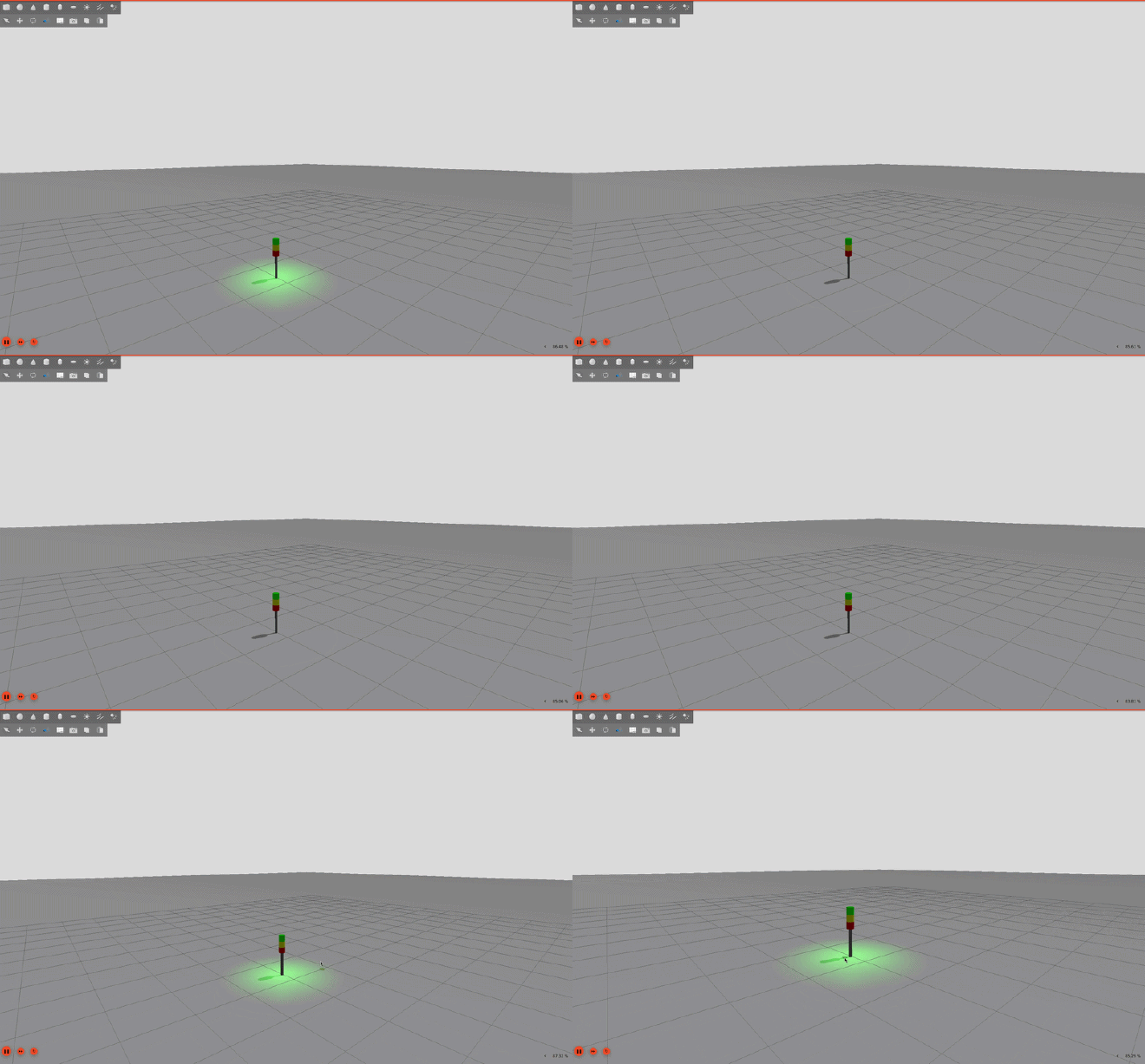
Can you see the problem?
Even though the blinking light changes illumination on surroundings, it does not truly represent an actual LED itself. When you look at any real world LEDs, they always have a diffuser on top to spread the light for a softer look (see the real robot gif above).
Currently, in Gazebo, we cannot simulate an actual diffuser. But, we can use a Visual Entity that changes its Material color in sync with the Light to simulate an actual diffuser. Therefore, our final <led> description would probably look like:
<plugin name="plugin_class_name_with_namespace" filename="plugin_shared_library_name">
  <led name="front_led">
    <visual_name>Name of the Visual</visual_name>
    <light_name>Name of the Light</light_name>
  </led>
  <led name="back_led">
    <visual_name>Name of the Visual</visual_name>
    <light_name>Name of the Light</light_name>
  </led>
</plugin>
With an equivalent C++ struct:
struct Led
{
  std::string ledName{""};
  std::string scopedVisualName{""};
  std::string scopedLightName{""};
  sim::Entity ledVisualEntity{kNullEntity};
  sim::Entity ledLightEntity{kNullEntity};
  math::Color defaultColor{math::Color::White};
  double defaultIntensity{0.0};
};
Configuring our Plugin: ISystemConfigure#
Using the sdf::Element API#
Now that we have our SDF snippet figured out, we need to parse it in our Configure(). This interface gives us a sdf::ElementConstPtr instance as an agrument which is basically the root element of our <plugin> tag. From here, it’s all about traversing the SDF tree and the sdf::Element API gives us a handful of methods for that:
HasElement()#
Before reading any child element, you should check whether it actually exists. HasElement() takes a tag name as a string and returns true if a child with that name is present:
For optional elements, it allows us to check if the user has provided a value or should we fall back to a sensible default. This is what happens in the snippet below where we set our this->dataPtr->ledGroupName from the optional <led_group_name> element if provided, else we default to use the Model Entity’s name.
if (_sdf->HasElement("led_group_name"))
{
  this->dataPtr->ledGroupName = _sdf->Get<std::string>("led_group_name");
}
else
{
  this->dataPtr->ledGroupName = "led_" + this->dataPtr->model.Name(_ecm);
}
this->dataPtr-> used here is the PIMPL idiom C++ pattern. Nearly all Gazebo plugins use this pattern.For required elements, say <led>, you’d typically log an error and return from Configure() if it is missing to signal that the plugin can’t proceed without it. For instance:
if (_sdf->HasElement("led"))
{
  // Parse LEDs...
}
else
{
  // Log some error
  return;
}
Get<T>()#
Get<T>() template function extracts and element’s value and converts it to the type you specify. This function handles conversions for common types like std::string, double, bool and custom types defined in Gazebo like gz::math::Color, gz::math::Vector, etc. out of the box:
this->dataPtr->ledGroupName = _sdf->Get<std::string>("led_group_name");
math::Color ledColor = stepElem->Get<math::Color>("color");
FindElement()#
FindElement() returns a sdf::ElementConstPtr pointing to the first child element matching the name. Here, this is our entry point to iterate over multiple elements of the same name:
  sdf::ElementConstPtr ledElem = _sdf->FindElement("led");
  // ledElem now points to the first <led> child element
GetNextElement()#
Once you have a pointer from FindElement(), calling GetNextElement() on it gives you the next element with the same name (similar to a linked list). It returns nullptr when there are no more matches, making it perfect for a while loop:
sdf::ElementConstPtr ledElem = _sdf->FindElement("led");
while (ledElem)
{
  // ... process this <led> element ...
  ledElem = ledElem->GetNextElement("led");
}
This pattern is used throughout our plugin for reading <led>, <mode> and <step> descriptions.
Factory Design Pattern is your friend#
As your plugin’s SDF configuration grows, dumping all the parsing logic into Configure() becomes quite messy.
What could be a cleaner approach?
Static factory methods named FromSDF(sdf::ElementConstPtr) in your data structs. Now each of your struct knows how to construct itself.
In our LED plugin, both, Led and LedMode structs, have a fromSDF() static factory method. They take a relevant sdf::ElementConstPtr and return a std::optional instance of their respective structs. The std::optional can be used to know if the contruction was successful or not.
This keeps Configure() compact without the low-level parsing details. For instance, this how we read all our LED modes in Configure():
// Read the described LED modes
if (_sdf->HasElement("mode"))
{
  sdf::ElementConstPtr ledModesElem = _sdf->FindElement("mode");

  while (ledModesElem)
  {
    auto ledMode = LedMode::fromSDF(ledModesElem);

    if (ledMode.has_value())
    {
      this->dataPtr->allLedModes.push_back(ledMode.value());
    }

    ledModesElem = ledModesElem->GetNextElement("mode");
  }
}
Internally, our LedMode::fromSDF() factory method can traverse the passed sdf::ElementConstPtr using the same sdf::Element API and return a fully constructed LedMode instance or std::nullopt if, say, a required child is missing.
Getting our Visual & Light Entity IDs#
To change a Visual’s material or a Light’s settings at runtime, we need their Entity IDs. Through our Led::fromSDF() factory method, we use the scoped names from our <visual_name> and <light_name> to get Entity IDs that we can use later in our PreUpdate().
This is where gz::sim::entitiesFromScopedName() comes in handy. It takes a scoped string name (like my_robot_model::led_link::led_visual) and a gz::sim::EntityComponentManager as an input and returns a std::unordered_set<Entity> of all entities matching that name. Here’s how we use this in our Led::fromSDF() factory method:
public: static std::optional<Led> fromSDF(sdf::ElementConstPtr _sdf,
  const EntityComponentManager &_ecm)
{
  Led led;

  // Some parsing to set led.ledName

  // Retrieving the Visual Entity
  if (_sdf->HasElement("visual_name"))
  {
    led.scopedVisualName = _sdf->Get<std::string>("visual_name");
    std::unordered_set<Entity> visualEntities = gz::sim::entitiesFromScopedName(led.scopedVisualName, _ecm);

    // Set the led.ledVisualEntity based on the contents of the set
  }

  // Do the same for Light

  return led;
};
Applying the LED Modes: ISystemPreUpdate#
This is where the magic happens. The PreUpdate() method runs before every physics step in the simulation loop and updates the appearance of our LEDs based on the current mode:
std::mutex.// Set the current step from the current LED Mode
LedModeStep currentLedModeStep = this->dataPtr->currentLedMode.modeSequenceSteps[this->dataPtr->currentModeStepIdx];
// Change the visual and light properties of the LEDs
if (this->dataPtr->currentLedMode.activeLedNames.empty())
{
// Set the state of all LEDs in the group
for (const auto &led : this->dataPtr->allLedsInGroup)
{
// Set the visual properties if the visual entity is not null
if (led.second.ledVisualEntity != kNullEntity)
{
this->dataPtr->SetVisualProperties(led.second.ledVisualEntity, _ecm, currentLedModeStep.ledColor);
}
// Set the light properties if the light entity is not null
if (led.second.ledLightEntity != kNullEntity)
{
this->dataPtr->SetLightProperties(led.second.ledLightEntity, _ecm, currentLedModeStep.ledColor,
currentLedModeStep.lightIntensity);
}
}
}
else
{
// Do the same thing but only for currentLedMode.activeLedNames
}
Using sim::UpdateInfo for Timed Operations#
Our PreUpdate() callback receives a gz::sim::UpdateInfo struct that contains the current simTime. Using this we keep track of the “on_time” of our current step and accordingly advance to the next:
The extra check cycleStartTime > currentSimTime handles the case where the sim time might have jumped back
// Set the cycle start time
if (this->dataPtr->cycleStartTime == std::chrono::duration<double>::zero() ||
    this->dataPtr->cycleStartTime > this->dataPtr->currentSimTime)
{
  this->dataPtr->cycleStartTime = this->dataPtr->currentSimTime;
}
std::chrono::duration<double> elapsed = this->dataPtr->currentSimTime - this->dataPtr->cycleStartTime;

// If we have crossed the elapsed time of the step on time, move to the next step
if (elapsed > currentLedModeStep.ledOnTime)
{
  // Increment/Reset currentModeStepIdx and reset our cycleStartTime
}
For steps with alwaysOn set to true we just apply the step once and return immediately after:
// If this step is supposed to be always on then just return
if (currentLedModeStep.alwaysOn)
{
  return;
}
VisualCmd & LightCmd Components#
So how do we actually tell the rendering engine to change a Visual’s color or a Light’s intensity? We don’t call rendering APIs directly. Instead, we use our entity’s command components. Then, its upto Gazebo’s internals to pick these command components and apply the changes.
Specifically:
components::VisualCmd: Request changes to our Visual Entity using a gz::msgs::Visual protobuf message.components::LightCmd— Request changes to our Light Entity using a gz::msgs::Light protobuf message.
For instance, here’s how we the VisualCmd Component in our plugin’s SetVisualProperties() function:
// Update the Visual's material color
msgs::Visual visualMsg;
msgs::Material *materialMsg = visualMsg.mutable_material();
msgs::Set(materialMsg->mutable_diffuse(), ledColor);
msgs::Set(materialMsg->mutable_emissive(), ledColor);

// Update or create the VisualCmd for our _visualEntity
auto visualCmdComp = _ecm.Component<components::VisualCmd>(_visualEntity);
if (!visualCmdComp)
{
  _ecm.CreateComponent(_visualEntity, components::VisualCmd(visualMsg));
}
else
{
  auto state = visualCmdComp->SetData(visualMsg, visualEq) ?
    ComponentState::OneTimeChange : ComponentState::NoChange;
  _ecm.SetChanged(_visualEntity, components::VisualCmd::typeId, state);
}
Advertising the Mode Change Service#
So we can define modes. We can animate LEDs. But how does the rest of the system (like your robot’s ROS stack) actually tell our plugin to switch modes at runtime?
Enter Gazebo Transport Services. In Configure(), we use our gz::transport::Node to advertise a led_group_name/change_mode service that allows you to request a mode change:
// In Configure()
std::string serviceName = "/" + this->ledGroupName + "/change_mode";
this->node.Advertise(serviceName, &LedPlugin::OnChangeModeRequest, this);
The callback is straightforward:
It receives the requested mode name and tries to find it in the allLedModes vector. If found, we udpate the currentLedMode & reset the currentModeStepIdx and cycleStartTime:
bool LedPluginPrivate::OnLedModeChange(const msgs::StringMsg &_req,
  msgs::Boolean &_resp)
{
  std::lock_guard<std::mutex> lock(this->mutex);
  std::string requestedModeName = _req.data();

  auto ledModeIter = std::find_if(this->allLedModes.begin(), this->allLedModes.end(),
    [&](LedMode _mode)
    {
      return _mode.name == requestedModeName
    });

  // If the requested mode was not found
  if (ledModeIter == this->allLedModes.end())
  {
    _resp.set_data(false);
    return false;
  }

  this->currentLedMode = *(ledModeIter);
  this->currentModeStepIdx = 0;
  this->cycleStartTime = std::chrono::duration<double>::zero();

  _resp.set_data(true);
  this->ledsReady = false;
  return true;
}